프로토타입 패턴
기존 객체를 복제하여 새 객체를 생성하는 패턴.
연습 문제
아래 코드를 프로토타입 패턴으로 리팩토링 해보세요.
public class Button {
    public String x, y, color;

    public Button(String x, String y, String color) {
        this.x = x;
        this.y = y;
        this.color = color;
    }
}

public class Main {
    public static void main(String[] args) {
        // 원본 버튼
        Button original = new Button("10", "40", "red");

        // 복제하려면 필드를 하나하나 복사해야 함
        Button copy = new Button(original.x, original.y, original.color);

    }
}
요구사항
- Prototype 인터페이스: clone() 메서드 선언
- ConcretePrototype: clone() 구현, 복사 생성자 사용
- PrototypeRegistry (선택): 프로토타입 객체들을 저장하고 복제본 반환

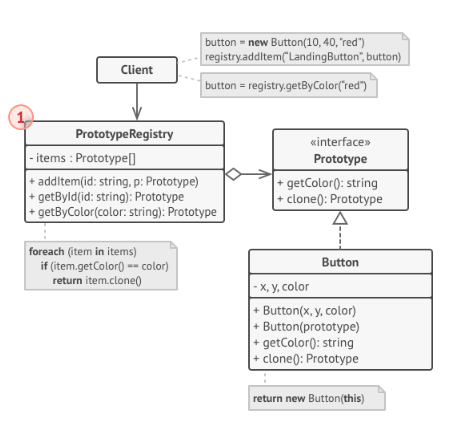
현재 문제점
- 필드 직접 복사 - 필드가 많으면 복사 코드가 길어짐
- private 필드 - 외부에서 접근 불가하면 복사 자체가 불가능
- 서브클래스 - 부모 타입으로 받으면 실제 타입을 알 수 없음
연습문제 정답 - 간단한 Prototype 패턴
1. Prototype 인터페이스
public interface Prototype {
    Prototype clone();
}
2. ConcretePrototype 구현
public class ConcretePrototype implements Prototype {
    public String str;

    public ConcretePrototype() {}

    // 복사 생성자 - 자기 타입을 받아야 필드 접근 가능
    public ConcretePrototype(ConcretePrototype prototype) {
        this.str = prototype.str;
    }

    @Override
    public Prototype clone() {
        return new ConcretePrototype(this);
    }
}
3. SubclassPrototype 구현
public class SubclassPrototype extends ConcretePrototype {
    public String subStr;

    public SubclassPrototype() {
        super();
    }

    public SubclassPrototype(SubclassPrototype prototype) {
        super(prototype);  // 부모 필드 복사
        this.subStr = prototype.subStr;
    }

    @Override
    public Prototype clone() {
        return new SubclassPrototype(this);
    }

    @Override
    public String toString() {
        return "SubclassPrototype{" +
                "subStr='" + subStr + '\'' +
                ", str='" + str + '\'' +
                '}';
    }
}
4. 클라이언트 코드
public class Main {
    public static void main(String[] args) {
        SubclassPrototype subclassPrototype = new SubclassPrototype();
        subclassPrototype.subStr = "sub - sub";
        subclassPrototype.str = "sub - str";
        System.out.println(subclassPrototype);

        SubclassPrototype cloned = (SubclassPrototype) subclassPrototype.clone();
        cloned.subStr = "new sub";
        cloned.str = "new str";
        System.out.println(cloned);
        System.out.println(subclassPrototype);  // 원본은 변경 안 됨
    }
}
연습문제 정답 - PrototypeRegistry
자주 사용하는 프로토타입을 미리 등록해두고 복제본을 반환하는 저장소.
1. Prototype 인터페이스 (확장)
public interface Prototype {
    Prototype clone();
    String getColor();
}
2. Button 구현
public class Button implements Prototype {
    public String x, y, color;

    public Button(String x, String y, String color) {
        this.x = x;
        this.y = y;
        this.color = color;
    }

    public Button(Button prototype) {
        this(prototype.x, prototype.y, prototype.color);
    }

    @Override
    public String getColor() {
        return this.color;
    }

    @Override
    public Prototype clone() {
        return new Button(this);
    }
}
3. PrototypeRegistry 구현
public class PrototypeRegistry {
    private Map<String, Prototype> items = new ConcurrentHashMap<>();

    public void addItem(String id, Prototype prototype) {
        items.put(id, prototype);
    }

    public Prototype getById(String id) {
        Prototype prototype = items.get(id);
        return prototype != null ? prototype.clone() : null;
    }

    public Prototype getByColor(String color) {
        for (Prototype p : items.values()) {
            if (p.getColor().equals(color)) {
                return p.clone();
            }
        }
        return null;
    }
}
getByColor()는 읽기 전용이고 clone()으로 새 객체를 반환하기 때문에 synchronized 없이도 스레드 세이프
4. 클라이언트 코드
public class Main {
    public static void main(String[] args) {
        PrototypeRegistry registry = new PrototypeRegistry();
        registry.addItem("redBtn", new Button("10", "40", "red"));
        registry.addItem("blueBtn", new Button("20", "50", "blue"));

        // ID로 복제
        Button btn1 = (Button) registry.getById("redBtn");

        // 색상으로 복제
        Button btn2 = (Button) registry.getByColor("red");
    }
}
참조
'개발지식 > Design Pattern' 카테고리의 다른 글
| 싱글톤 패턴을 구현하는 5가지 방법 (0) | 2026.01.06 |
|---|---|
| 어탭터 패턴 (객체 어댑터, 클래스 어댑터) - 개념과 연습문제 (0) | 2025.12.28 |
| 빌더 패턴 - 개념과 연습문제 (0) | 2025.12.24 |
| 추상 팩토리 패턴 - 개념과 연습 문제 (0) | 2025.12.24 |
| 팩토리 메서드 패턴 - 개념과 연습문제 (0) | 2025.12.24 |